Cloud PACS & Imaging Archive
Without the PACS Hardware.

View, route, share and protect medical images from anywhere, with a zero-footprint DICOM viewer, a cross-site worklist and an immutable vendor-neutral archive that connects to the modalities and PACS you already have. Every study is AI-ready the moment it's archived.

Web & Desktop Viewer Vendor-Neutral Archive AI-Ready Data HIPAA Compliant

Everything You Need from a Cloud PACS

One platform for viewing, managing, routing and archiving medical images across every site. Use it alongside your existing PACS or to take on-premises hardware out of the picture.

Web & Desktop DICOM Viewer

A zero-footprint viewer that runs in any modern browser, with nothing to install. For large studies, the optional Desktop Viewer runs the same viewer natively.

Cloud Worklist

Search every study across all your sites by patient, date, modality or accession, then view, send, share or download it in a click.

Vendor-Neutral Archive

Standards-based DICOM storage that isn't tied to any PACS vendor. Every version of every study is retained, so a correction never overwrites the original.

DICOM Routing & Rules

Auto-forward studies to any DICOM destination, filter by tag, fix malformed headers and transcode transfer syntaxes on the fly, all driven by configurable rules.

Edge Integration

A lightweight edge server at each site speaks DICOM (C-STORE, C-FIND, C-MOVE) to your modalities and PACS. No rip-and-replace, and adding a site doesn't mean a migration.

Image Sharing

Share a study by link with anyone who needs it, without creating a portal account or burning a CD.

Ransomware-Proof Backup

Immutable, versioned cloud storage can't be silently encrypted or deleted, so you can always recover a known-good copy of your imaging.

AI-Ready Imaging Data

Every study is indexed as it's archived, ready for research, AI development and de-identified dataset programs. Explore available data.

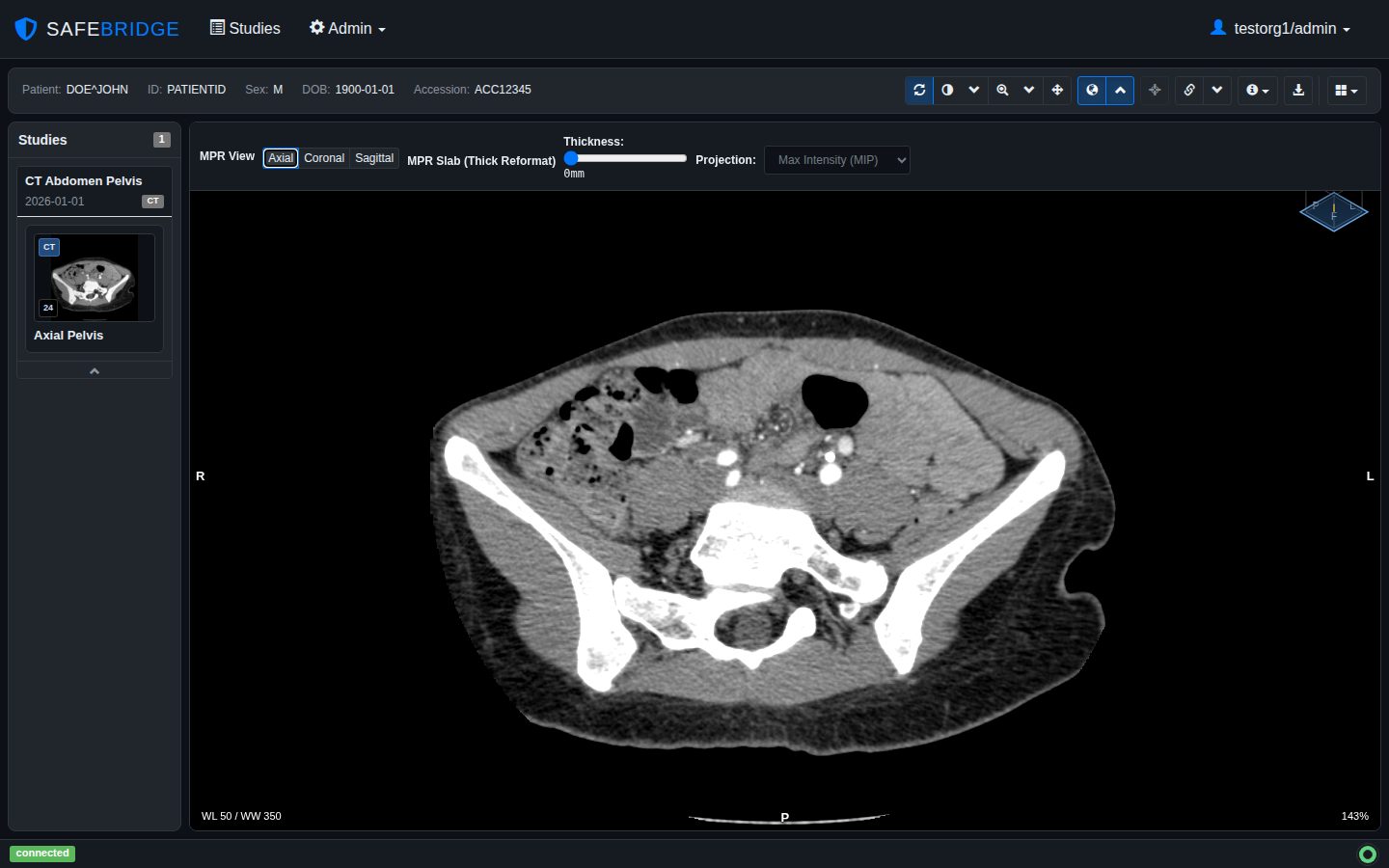
SafeBridge DICOM viewer showing an axial CT of the pelvis in MPR mode, with slab thickness and MIP projection controls

A Fast, Full-Featured DICOM Viewer

Open any study straight from the worklist in the browser, or in the Desktop Viewer for the largest studies. Both run the same viewer, so there is only one tool to learn.

  • MPR: axial, coronal, sagittal and freely rotated planes, with thick-slab MIP
  • Window/level with DICOM presets, plus zoom, pan, rotate, flip and invert
  • Layouts (1x1, 1x2, 2x2) with drag-and-drop series and prior-study comparison
  • Cine playback for multiframe, ultrasound and angiography series
  • CT HU readout under the cursor, and keyboard shortcuts for fast navigation
  • Renders presentation states (GSPS), structured reports, overlays and encapsulated PDFs
  • Desktop Viewer pre-caches studies and priors locally before you open them

The SafeBridge viewer is intended for image review. It is not FDA 510(k) cleared for primary diagnostic interpretation.

Works with Your Existing PACS and Modalities

SafeBridge fits into the imaging workflow you already run, speaking standard DICOM at every step.

1

Connect each site

An edge server receives studies from your modalities and PACS over DICOM, and can query and retrieve from them too.

2

Archive and index

Studies are stored in immutable, versioned cloud storage and appear in one worklist across every site.

3

View, route and share

Open studies in the viewer, auto-route them to a reading PACS or partner, and share them by link.

Built for

Imaging centers & multi-site groupsOne worklist and archive across every location.
Teleradiology & remote reviewImages available from anywhere, with no VPN or on-site workstation.
PACS migration & replacementMove off aging on-premises storage without a big-bang cutover.
PACS backup & disaster recoveryAn immutable offsite copy you can restore from.
Referring physicians & partnersShare studies by link instead of CDs.
Research & AIPut archived imaging to work in de-identified datasets.

Medical Imaging Data for AI

Building AI models? SafeBridge can assemble de-identified, multi-site imaging cohorts from providers with data sharing agreements, with reports included.

Explore Available Data

Frequently Asked Questions

Is SafeBridge a PACS?

SafeBridge provides core cloud PACS capabilities: DICOM archiving, a cross-site worklist, a web and desktop viewer, and DICOM routing. The viewer is intended for image review and is not yet FDA 510(k) cleared for primary diagnostic interpretation.

Does SafeBridge replace my PACS or work alongside it?

Either. Many organizations run SafeBridge alongside their existing PACS as a vendor-neutral archive, backup, routing and sharing layer. Others use it to reduce their reliance on on-premises PACS hardware.

Do I need to install anything?

The worklist and viewer run in any modern browser with nothing to install. Each site runs a lightweight SafeBridge edge server that connects to your modalities and PACS. An optional Desktop Viewer is available for faster reading of large studies.

Is SafeBridge HIPAA compliant?

Yes. SafeBridge is built for HIPAA-compliant handling of medical images, with access limited to your organization's users and immutable, versioned storage that protects against tampering and ransomware.

How does SafeBridge protect imaging data from ransomware?

Studies are stored in immutable, versioned cloud storage. Ransomware inside your network, or an accidental deletion, can't overwrite or remove the archived copy, so you can always restore a known-good version.

Can our imaging data be used for AI research?

Yes, where your agreements permit it. Studies are indexed as they're archived, and SafeBridge can assemble de-identified datasets for research and AI development. See available imaging data.

See SafeBridge in Action

Talk to us about replacing or extending your PACS, archiving and routing across sites, or putting your imaging data to work. We're happy to answer questions about implementation, pricing and migration, or to walk you through a live demo.

We're here to help with:

Live product demonstrations

PACS migration planning

Multi-site deployment

Security and compliance questions

Imaging data for AI

Pricing and licensing options

Typical response time: within 24 hours